
What Is CRM Software? A Buying Guide for Aesthetic Clinics
CRM software stores each client's profile, history and conversations in one place so your team can follow up at the right time. This guide explains what CRM does, what it includes and 10 questions to ask before you buy.

CRM software is a tool that keeps everything about each client (profile, appointments, messages, treatment courses, payments) in one place, so your whole team looks after the right person at the right time. For an aesthetic clinic, CRM software helps you avoid missing client messages, forgetting appointment reminders, and losing track of who is about to abandon a treatment course. This article explains it with concrete examples, plus a table of 10 questions to ask before buying and a plan for the first 30 days.
What is CRM, and what do aesthetic clinics use it for?
CRM stands for customer relationship management. It is the way you remember and look after your clients, and CRM software is the tool that does this in place of notebooks, Excel or your receptionist's memory.
Picture Lan, a regular client. Last time she bought a 10-session skincare package, has used 6 sessions, usually books on Saturdays and asked for no strong scents. If all of that lives in the head of a receptionist who has since quit, you lose both the client and the way she likes to be treated.
Aesthetic clinics mainly use CRM to:
Keep each client's profile and history in one place.
Remind clients of appointments and of sessions left in their course.
Reply to clients quickly without missing messages.
See which clients haven't come back in a while so you can call them.
Measure which consultant closes well and which channel brings clients in.
Keeping a client coming back is usually cheaper than finding a new one. You can read 8 specific actions in How to retain spa clients: 8 things that bring them back a second time.
What can CRM software do for you every day?
Every day, CRM software handles the repetitive tasks that receptionists and consultants tend to forget when the clinic is busy. Here is a typical working day.
Time of day | What CRM does | Who uses it |
|---|---|---|
Early morning | List of today's appointments and clients who need a reminder | Receptionist |
Working hours | Open the profile when the client arrives, note preferences, deduct a session from the package | Receptionist, technician |
Throughout the day | Bring Zalo and Messenger messages into one place and assign who replies | Consultant |
End of day | Revenue, outstanding balances, unclosed clients to call back | Manager, accountant |
The real difference is proactive reminders. For example, you set a rule: if a client has 2 or more sessions left and hasn't come in for 30 days, the system alerts a consultant to call and check in. This is a hypothetical example; adjust the number of days to fit your own treatment courses.
What parts does CRM software include?
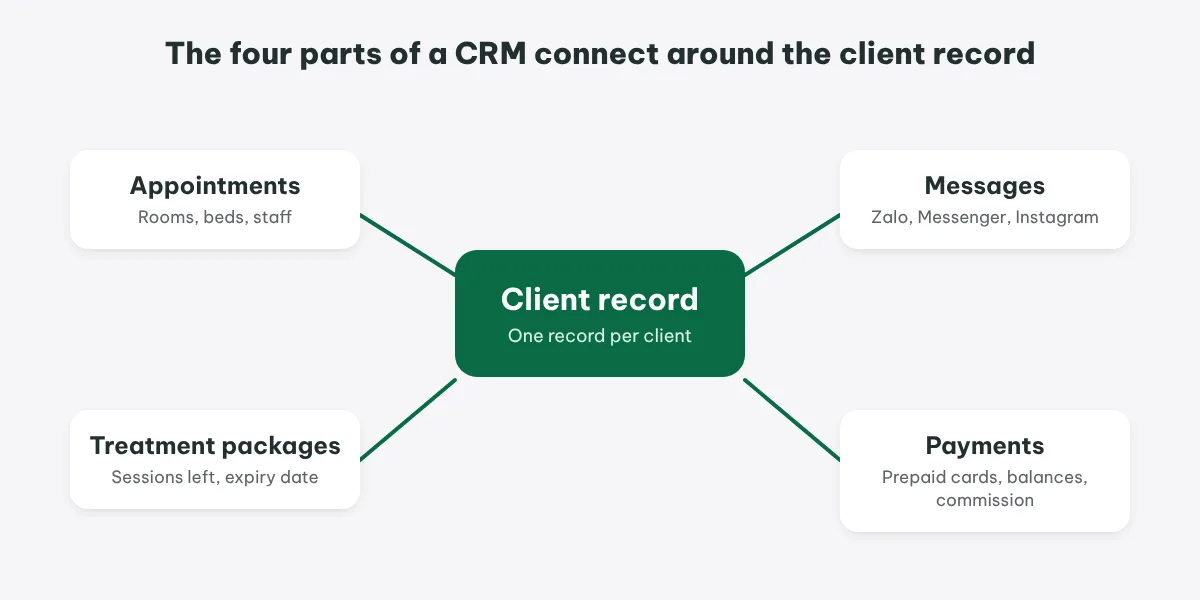
A CRM that works for an aesthetic clinic usually has four connected parts: profiles, appointments, messages and treatment courses. If one is missing, staff end up copying by hand between different places. A diagram of all five blocks, including reports, is in What does a CRM system include?
Client profiles
These cover name, contact details, birthday, client source, preference notes and service history. The simpler the profile, the easier it is to use. How to gather scattered data is covered in Managing spa client profiles.
Appointments
One shared calendar for rooms, beds and staff, so nothing gets double-booked. If scheduling is your pain point, read Appointment management software for aesthetic clinics.
Messages
Clients message you on Zalo, Messenger and Instagram. A good CRM brings them into one inbox and attaches each message to the client's profile. See also Omnichannel inbox for spas.
Treatment courses and prepaid cards
This is the part many generic CRMs lack. The system needs to record sessions remaining, expiry date and who performed the service, and calculate commission per session. Without it, you will still be tracking cards in a separate notebook.
How do single-location clinics and multi-branch chains need CRM differently?
A single-location clinic needs a simple CRM that is easy to learn; a multi-branch chain also needs shared data and permissions. The worst mistakes are buying a version that is too heavy for one location, or too light for a chain.
Criteria | Single location | Chain of 2+ branches |
|---|---|---|
Client profiles | One list | Shared, so clients are recognized at any branch |
Prepaid cards | Deduct sessions on site | Cross-branch usage rules, reconciliation of balances |
Permissions | Owner and receptionist | By role and by branch |
Reports | Daily and monthly revenue | Branch comparison, commission, inventory |
For a chain, the hard question is this: when a client buys a card at branch A but uses it at branch B, who gets the revenue and the commission? Decide this rule first, then check whether the software can be configured to follow it. Details are in Managing a multi-branch aesthetic clinic: 6 things your software must do.
How do you choose CRM software? 10 questions to ask before buying
Ask the vendor these 10 questions and have them try it on your own data, rather than just watching a demo.
# | Question | A good sign |
|---|---|---|
1 | Does it manage prepaid cards and treatment courses? | Session deduction, expiry and refunds are built in |
2 | Can it bring in Zalo, Messenger and Instagram? | Messages attach to the client profile |
3 | Does the calendar warn about clashes in rooms, beds or staff? | Warns immediately when booking |
4 | Does it calculate staff commission automatically? | Configurable by service and by session |
5 | Are permissions set by role and branch? | Receptionists can't see chain-wide revenue |
6 | Are branch reports ready to use? | No need to compile them by hand in Excel |
7 | How is personal data protected? | Clear explanation of storage, backup and data export |
8 | Can you import old data from Excel? | Import support and checking are offered |
9 | Is it easy to use on a phone? | A receptionist can learn it in one session |
10 | What support is offered, when and through which channel? | Someone answers during working hours |
If you run a clinic, also ask about electronic medical records (EMR). The implementation deadline is 31/12/2026, so ask for a specific roadmap and check the current regulations before you decide. You can read the checklist for implementing electronic medical records before the 31/12/2026 deadline. On personal data, read more in protecting client information at aesthetic clinics under the 2026 data law.
How should you start in the first 30 days?
Split the 30 days into four weeks, each with one small goal. Don't try to switch on every feature at once.
Week 1, clean up your data: gather client lists from Excel, notebooks and Zalo. Remove duplicates and wrong numbers. Choose one person in charge.
Week 2, import and set rules: enter profiles, cards with sessions left, and your service price list. Set permissions for each role.
Week 3, run in parallel: receptionists book appointments and deduct sessions in the software, while keeping the old notebook to cross-check at the end of each day.
Week 4, drop the old notebook and read reports: use only the system, and hold a 15-minute meeting to look at your first report.
After 30 days, track a few simple numbers such as the client return rate and the number of unanswered messages. How to read them is covered in 7 metrics for managing a spa or aesthetic clinic.
Is Qub-X an option for aesthetic clinic CRM?
If you need one tool that brings together an omnichannel inbox, appointments, profiles, treatment courses, prepaid cards, commission and branch reports, Qub-X is an option worth considering. Qub-X also already has electronic medical records (EMR) built into the client profile. You can look at the features of Qub-X spa management software, then book a demo or start a 7-day trial to test it with your own real data.
Frequently asked questions
How is CRM software different from clinic management software?
CRM focuses on looking after clients. Clinic management software is broader, adding inventory, timekeeping, commission and payments. Many products combine both.
Does a small clinic need CRM software?
Yes, if you have already forgotten appointments or prepaid cards, or missed messages. For a small clinic, choose a simple version that is quick to learn.
Can Excel and Zalo replace a CRM?
They can when you have few clients, but data is scattered, reminders are hard and information is lost when staff leave. Once you have prepaid cards or multiple branches, switch to software.
How long does it take to set up a CRM?
Usually about 30 days if the data is cleaned beforehand, as in the four-week plan above. The actual time depends on your number of clients and branches.
Should clinics watch for anything else?
Yes. Ask about personal data security and electronic medical records, and check the current regulations or ask your legal officer.
Related articles
All articles on Customer care- Customer care
Post-Treatment Customer Care Process: 6 Steps and Sample Messages
A post-treatment customer care process for aesthetic clinics: 6 steps on a clear timeline, with a sample message for each step and tips for making the process run on its own.
- Customer care
Aesthetic clinic CRM vs a regular CRM: 7 differences
Many clinics try a sales CRM and find it does not fit: no packages, no allergy field, no Zalo. This guide compares an aesthetic clinic CRM with a regular CRM on 7 points, so you can tell which one your clinic needs.
- Customer care
Customer Segmentation in a CRM: 5 Groups and How to Look After Each One
Sorting clients into 5 groups along their journey tells your aesthetic clinic who to contact today. Includes grouping rules, what to do for each group, and 3 metrics to track results.