
Multichannel inbox for spas: never miss a Zalo or Facebook message
A customer asks on Facebook, follows up on Zalo, then confirms the appointment on yet another channel. A multichannel inbox brings it all into one place, gives every conversation an owner and lets you measure response times.
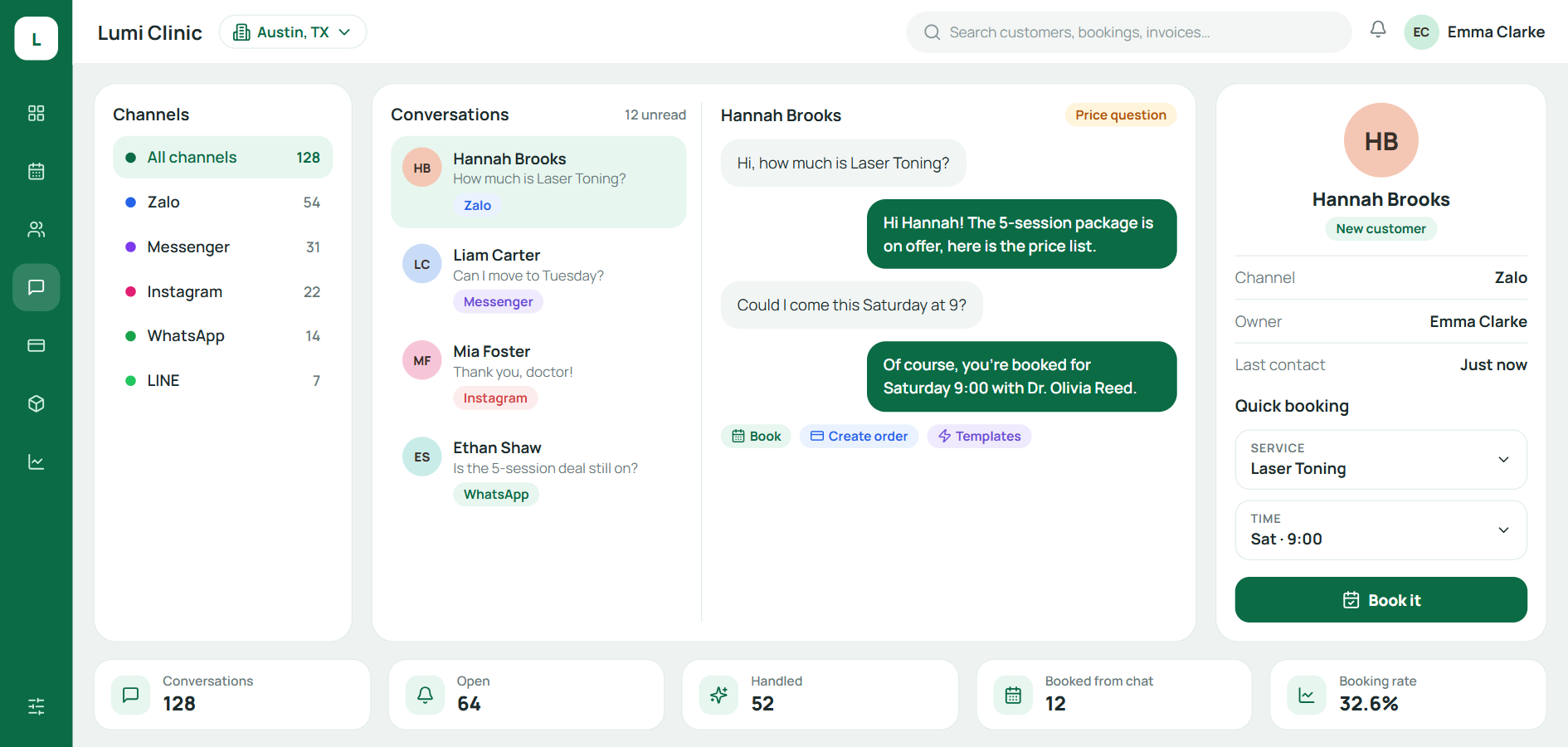
A multichannel inbox brings messages from Zalo, Facebook Messenger, Instagram and other channels onto one shared screen, so every conversation has an owner and a status and is linked to the customer record, instead of being scattered across each employee's phone. For spas and aesthetic clinics, where most customers start with a message asking about prices, it is the simplest way to stop missing customers. This article explains how to organize a shared inbox, set response-time targets and measure the results.
Many channels create many blind spots
A customer might start on Facebook, ask a few more questions on Zalo and confirm an appointment on yet another channel. If each account can only be opened on one person's phone, or sits in its own separate inbox, the team runs into familiar blind spots:
A message arrives while the person covering that channel is off shift, and nobody sees it.
Two consultants reply to the same customer and quote two different prices.
A customer messages again a week later, and whoever replies has no idea what was discussed last time.
The owner doesn't know which channel brings in the most appointments.
Each blind spot is a customer who might go to another spa simply because they got an answer a few hours later.
Personal accounts or spa accounts?
Before bringing your channels together, make sure the spa is consulting through accounts that belong to the spa, not through employees' personal accounts.
Employee's personal account | Spa account (Zalo Official Account, Facebook Page) | |
|---|---|---|
Conversation data belongs to | The employee | The spa |
When the employee leaves | Customer history leaves with them | History stays and is handed over to someone else |
Several people covering at once | Not possible | Possible, with permissions |
Can be added to a shared inbox | No | Yes |
This is the foundation. If staff keep consulting on their personal Zalo, even the best multichannel inbox will only see some of your customers.
3 principles of an effective multichannel inbox
Bringing channels together is only the first step. The inbox also needs a shared way of working, so that every conversation has clear ownership.
1. Every conversation has one owner
There are three common ways to assign conversations: by shift, by the branch the customer wants to visit, or round-robin among consultants. Returning customers should be routed back to the consultant who advised them before.
2. Statuses everyone uses the same way
Three statuses are enough: new (no one has picked it up yet), in progress (someone has picked it up) and done (fully answered or booked). When the whole team reads them the same way, a single glance shows what is still waiting.
3. Conversations are linked to the customer record
The message history has to live on the customer record, next to appointments and past services, rather than separately inside each channel. Our article on spa customer records management explains why the "one customer, one record" rule matters.
Set response-time targets
Customers asking about prices often ask several spas at once, so the speed of your first reply directly affects who they choose. Set targets that suit your team, for example:
Situation | Suggested target | How to do it |
|---|---|---|
During business hours | First reply within 15 minutes | The person on shift picks up the conversation immediately |
Outside business hours | Instant auto-reply, real reply first thing in the morning | The auto-reply states your business hours and when you will respond |
Customer has an appointment today | Highest priority | Flag it so the front desk handles it first |
Complaint | Reply the same day, with someone following it through to the end | Escalate to the team lead |
These times are only examples; what matters is that the spa picks a target, measures it and improves over time.
Quick reply templates
Quick replies make the first response both fast and true to the spa's voice. Here are three sample templates:
Price inquiry: "Hello, and thank you for your interest in our skincare services. So I can recommend the right package for you, could you tell me a little about your skin's current condition?"
After hours: "Thank you, we've received your message. The spa is open from 9:00 to 20:00, and I'll get back to you first thing tomorrow morning."
Appointment confirmation: "I'm confirming your appointment at 15:00 on Thursday at our District 3 branch. If you need to change the time, just send me a message."
Don't let quick replies stand in for real advice. A template is only the opening line; the next message has to fit the customer who is actually asking.
Measure response quality with 4 metrics
First response time: from the moment the customer sends a message to the moment someone replies.
Backlogged conversations: conversations still in new or in-progress status after the target time.
Conversation-to-appointment rate: a measure of consultation quality.
Appointments by channel: shows which channels are worth putting advertising money into.
These metrics tell you whether the problem lies in staffing levels, in how work is assigned or in the quality of consultations. Put them next to the other metrics in our article on 7 key spa management KPIs to see the full journey from first message to revenue.
Appointment reminders on Zalo: template messages (formerly ZNS)
Besides two-way chat through a Zalo Official Account, Zalo offers businesses a template messaging service, now called ZBS Template Message (formerly ZNS). The service is well suited to appointment confirmations, appointment reminders and follow-up visit reminders:
Messages are sent to the phone number the customer uses for Zalo; the customer doesn't need to follow the spa's account first.
The spa needs a verified Official Account, and every template has to be approved by Zalo before it can be sent.
Under Zalo's template review rules, messages may only be sent to customers who have already transacted with the business, the message text cannot contain links or phone numbers (these go in buttons instead), and businesses in conditional (regulated) business lines may be asked to provide a license.
That makes it a channel for caring for customers who have already visited the spa, not a channel for advertising to new ones. Reminder messages should also leave out treatment details, because that is the customer's health information; see our article on customer data security and permissions in aesthetic clinics.
Step-by-step rollout
Move every consulting channel to accounts owned by the spa.
Start with the two channels that get the most messages, usually Zalo and Facebook.
Agree on the assignment rules and the three conversation statuses.
Train the team on common scenarios and the set of quick replies.
Once the process is stable, connect more channels without changing the core principles.
A multichannel inbox is one of the features to look at closely when choosing spa management software. If you're looking for a tool, Qub-X is one option that brings your messaging channels into a single inbox and links each conversation to the customer record and appointments.
Frequently asked questions
How is a multichannel inbox different from using several phones to watch messages?
With several phones, each device has its own inbox, nobody sees the whole picture and response speed can't be measured. A multichannel inbox lets the whole team see every conversation, who owns it and which ones are still waiting.
Should staff consult customers on their personal Zalo?
No. When an employee leaves, the consultation history and the relationship with the customer leave with them. Use accounts owned by the spa for every conversation with customers.
Does a small spa need a multichannel inbox?
Yes, once two or more people answer messages, or once you receive messages on two or more channels. That's when messages start getting missed or answered twice.
What is ZNS, and can a spa use it for appointment reminders?
ZNS is the former name of Zalo's template messaging service, now called ZBS Template Message. Spas can use it to confirm and remind customers who have transacted with them before about appointments, as long as they have a verified Official Account and Zalo has approved the templates.
Sources
Related articles
All articles on Customer care- Customer care
Spa customer retention: 8 ways to bring clients back a second time
New clients take effort to find; returning clients are what build lasting revenue. Here is how to measure your return rate, a 30-day aftercare schedule and 8 things your spa should start doing now.
- Security & compliance
EMR implementation for aesthetic clinics: a checklist before 31 December 2026
Fewer than 8 weeks remain until 31 December 2026. This 6-step checklist covers EMR implementation for aesthetic and dermatology clinics under Circular 13/2025/TT-BYT, without pausing appointments.
- Clinic operations
Aesthetic Clinic Management Software: Turning Client Data Into a Competitive Edge
Client data scattered across chat apps, Excel files and separate systems rarely becomes an advantage. Here is how aesthetic clinic management software helps a clinic organise and use its client data on one platform.