
What Does a CRM System Include? A Simple Diagram for Aesthetic Clinics
A CRM system for an aesthetic clinic has 5 connected parts: inbox, client records, appointments, treatment courses and payments, and reports. See a simple data flow diagram and a sample permissions table for a 3-branch chain.

A CRM system for an aesthetic clinic has 5 connected parts: a messaging inbox, client records, appointments, treatment courses and payments, and reports. Miss one, and your data breaks and staff end up writing things down by hand. This article draws a simple diagram and gives you a sample permissions table for a 3-branch chain.
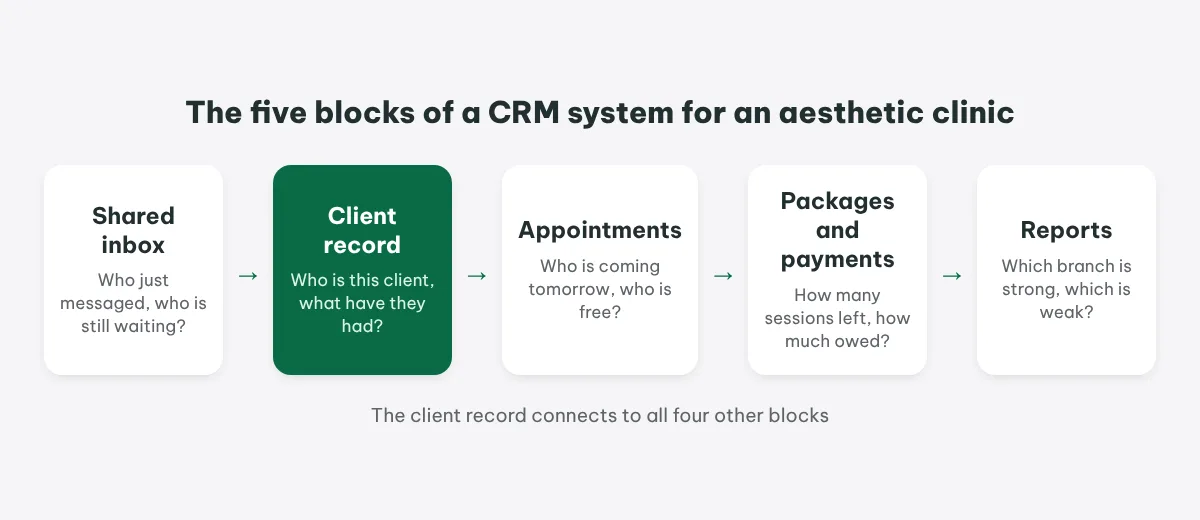
What parts does a CRM system include?
A CRM system that is enough for a clinic has 5 parts, and each one answers a question you ask every day.
Part | Main job | Question it answers |
|---|---|---|
Multichannel inbox | Gathers Zalo, Messenger and Instagram messages in one place | Who just messaged, and who hasn't had a reply? |
Client records | Stores details, lead source, notes and history | Who is this client, and what have they had done? |
Appointments | Holds slots by room, bed and staff member | Who is coming tomorrow, and who is free? |
Treatment courses and payments | Prepaid cards, remaining sessions, outstanding balances | How many sessions does the client have left, and how much do they owe? |
Reports | Revenue, returning clients, commissions | Which branch is doing well, and which is struggling? |
If you are comparing tools, also read client management software for clinics: how to choose the right one.
How does data move from a message to a client record?
Data follows one straight line: a message becomes a record, a record becomes an appointment, an appointment becomes a session, and a session becomes revenue. Automate each step as much as you can so staff never have to retype anything.
The client messages. The message lands in the shared inbox, tagged with the channel and the branch they are interested in.
Create the record. The consultant creates a record straight from the chat window and notes the client's needs and lead source.
Book the appointment. The receptionist picks the time, room and technician; the client gets a reminder.
Deliver the service. The technician confirms the session, and the system deducts one session from the treatment course.
Take payment. Payment, outstanding balance and commission are recorded at the same time.
Follow up. The system reminds you of clients whose courses are almost used up or who haven't been back for a while.
You can read more about messaging in multichannel inbox for spas, and about records in managing spa client records.
Who in the clinic uses which part?
Each role only needs 1–2 main parts, so don't make everyone learn everything.
Receptionist: inbox, appointments, taking payment, client check-in.
Consultant: inbox, client records, selling treatment courses, reminding clients to return.
Technician: their own schedule, session notes.
Accountant: payments, outstanding balances, commissions, end-of-day reconciliation.
Branch manager and owner: reports, timekeeping, inventory.
Your accountant should reconcile by shift, not pile it all up at month-end. For the numbers worth watching, see 7 metrics for managing a spa and aesthetic clinic.
How does a CRM system work across multiple branches?
For a chain, client records are shared across the whole chain, while schedules, inventory and revenue are kept separate for each branch. That way a client who switches branches is still recognized, and you can still compare each location.
Three rules to keep:
One client, one record, searched by phone number to avoid duplicates.
Clear rules for prepaid cards: which branches accept them and how sessions are deducted.
Reports you can view by branch and combined for the whole chain.
Multi-branch operations are covered further in how to retain spa clients, because clients often leave when each branch knows only a little about them.
What does a sample permissions table look like for a 3-branch chain?
The table below is a reference example; adjust it to the way your clinic works. Key: X means view and edit, View means view only, blank means no access.
Role | Inbox | Client records | Appointments | Payments, balances | Commission | Reports |
|---|---|---|---|---|---|---|
Receptionist (own branch) | X | X | X | X | ||
Consultant (own branch) | X | X | View | View | View own | |
Technician | View relevant notes | View own schedule | View own | |||
Accountant (whole chain) | View | View | X | X | X | |
Branch manager | View | X | X | View | View | View own branch |
Chain owner | View | View | View | View | X | X whole chain |
Which tool should you use to run this CRM system?
You can start with notebooks and spreadsheets, but once you have 2 or more branches, the data usually drifts out of sync. One option is Qub-X, software that brings together the inbox, appointments, records, prepaid cards, commissions and reports by branch; electronic medical records are available. See spa management software, then book a demo or start a 7-day trial to test it with your own data.
Frequently asked questions
How is a CRM system different from clinic management software?
A CRM focuses on clients: messages, records, follow-up. Clinic management software usually includes the CRM plus scheduling, inventory, timekeeping and accounting.
Does a small clinic need a CRM system?
Yes, if you have ever forgotten a client's name or missed a message. A single-site clinic can start with a simple version.
Should you set many permissions or few?
Grant only what is needed to do the job. Access to revenue and commission should be limited to the accountant, managers and the owner.
Does a client lose their history if they switch branches?
No, as long as records are shared across the whole chain and searched by phone number.
Related articles
All articles on Clinic operations- Clinic operations
How to calculate aesthetic clinic therapist commission: 4 models with examples
Aesthetic clinic therapist commission that is wrong or late can drive good therapists away. Here are 4 commission models, worked examples and how to build a transparent commission statement.
- Clinic operations
How to Compare CRM Software: A 12-Criteria Scorecard for Aesthetic Clinics
A 12-criteria scorecard to compare CRM software for aesthetic clinics using real tasks in the demo, with how to set weights and an example scoring three products.
- Clinic operations
Moving Client Data from Excel to a CRM: 6 Steps Without Losing a Number
6 steps to move client data from Excel to a CRM for an aesthetic clinic: gather files, remove duplicates, map columns, run a test import, check three totals and lock the old file.