
Clinic Management Software: The CRM Solution From Qub-X
Customer details scattered across Zalo, Excel and the appointment book make it hard for a clinic to care for clients and keep operations under control. Here is how one central system fixes that.

In many clinics, one client's details live in several places: consultation messages in Zalo, appointments in a notebook, treatment packages in an Excel file and payment history in a sales app. As the number of clients grows, staff spend more and more time searching and cross-checking, and the owner struggles to see the whole picture. Clinic management software brings everything into one system. This article explains what the software is, why a clinic should use it, and how the Qub-X CRM solution works.
1. What is clinic management software and how does it work?
Clinic management software is a system that lets a clinic record and follow each client's whole journey, from the first consultation to treatments and aftercare, on one shared set of data. Front desk, consultants, doctors and cashiers all work from that data instead of each keeping their own copy.
The main groups of features
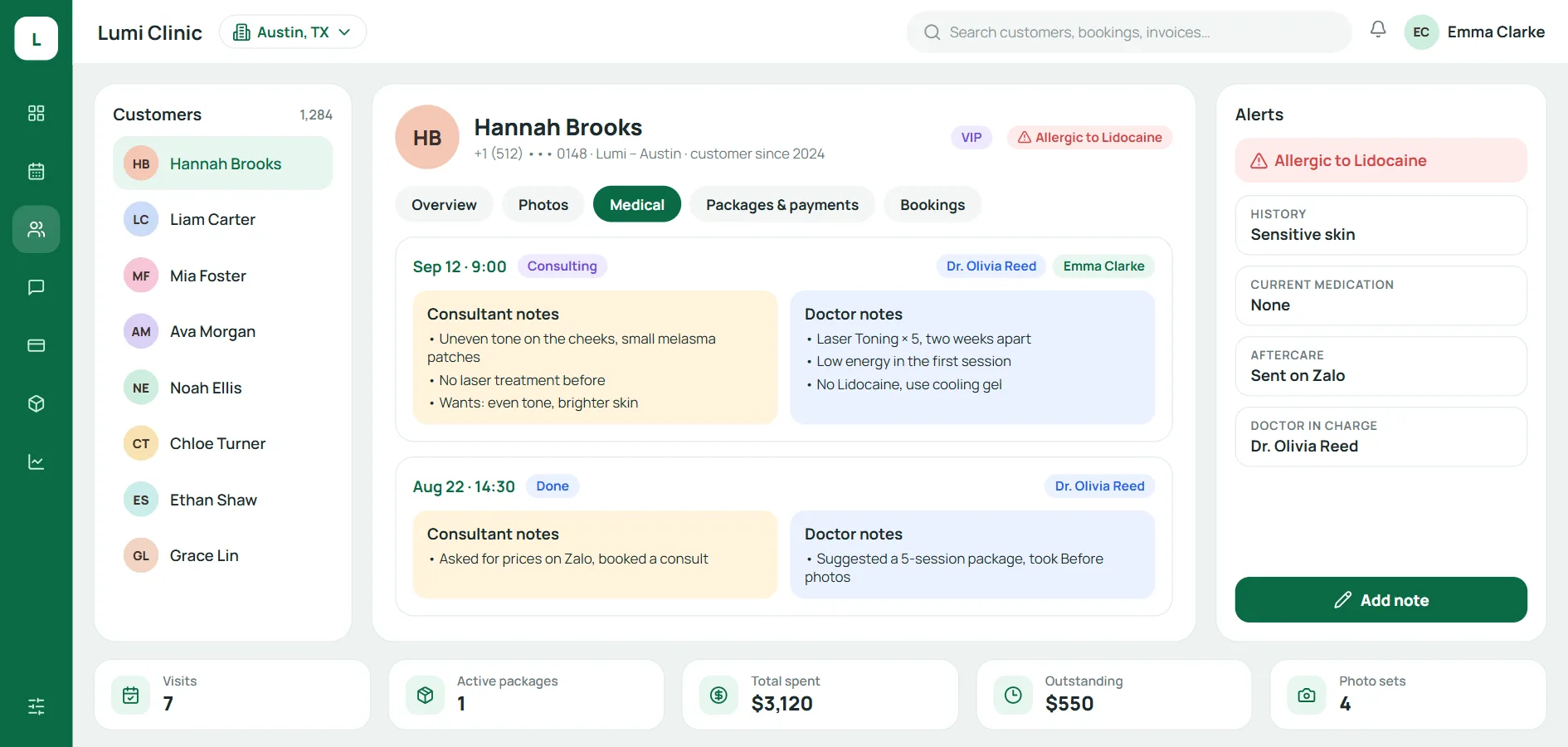
Client records: personal details, consultation history, services used, before-and-after photos.
Appointments: schedules by doctor, technician and room, with no double bookings.
Treatment packages: sessions done and sessions left in each package.
Payments: invoices, prepaid packages and each client's outstanding balance.
Reports: revenue, visits, staff performance and branch performance.
How is online clinic management software different from installed software?
Installed software runs on a server inside the clinic: the data stays on site, but the clinic must handle backups, updates and the link between branches itself. Online clinic management software runs in the cloud: anyone with internet access can use it on a computer, tablet or phone, the provider handles updates and backups, and every branch shares one set of data. When choosing an online product, ask where the data is stored, how it is backed up and whether you can export it when you need to.
2. Why use clinic management software?
The biggest gain is not having one more tool, but removing repeated work and the places where mistakes creep in.
Client data in one place, less re-entry and reconciling
Details are entered once and reused at every step: the front desk books the appointment, the doctor reads the treatment history, the cashier issues the invoice. No more matching the appointment book against Excel and receipts at the end of the day.
Control over revenue, costs, staff and reports
Revenue, prepaid packages, staff commission and consumables used are totalled automatically. The owner can view figures by day, by service or by staff member without waiting for someone to compile a report.
Follow-up and return-visit reminders that are not missed
Clients get a reminder one day before their appointment, and staff can see at once who is due for a follow-up visit or their next treatment session. Care no longer depends on any one person's memory.
Online clinic management software lets you manage anytime, across branches
With online clinic management software, the owner can follow every branch remotely, a client can be looked up at whichever branch they visit, and access to data is set by each staff member's role.
3. Professional clinic management software - Qub-X
Qub-X is clinic management software for aesthetic clinics, dermatology clinics and spas. It puts the client record at the centre and connects every part of daily operations to it. Qub-X runs fully online, in Vietnamese, English and Korean.
Central client records
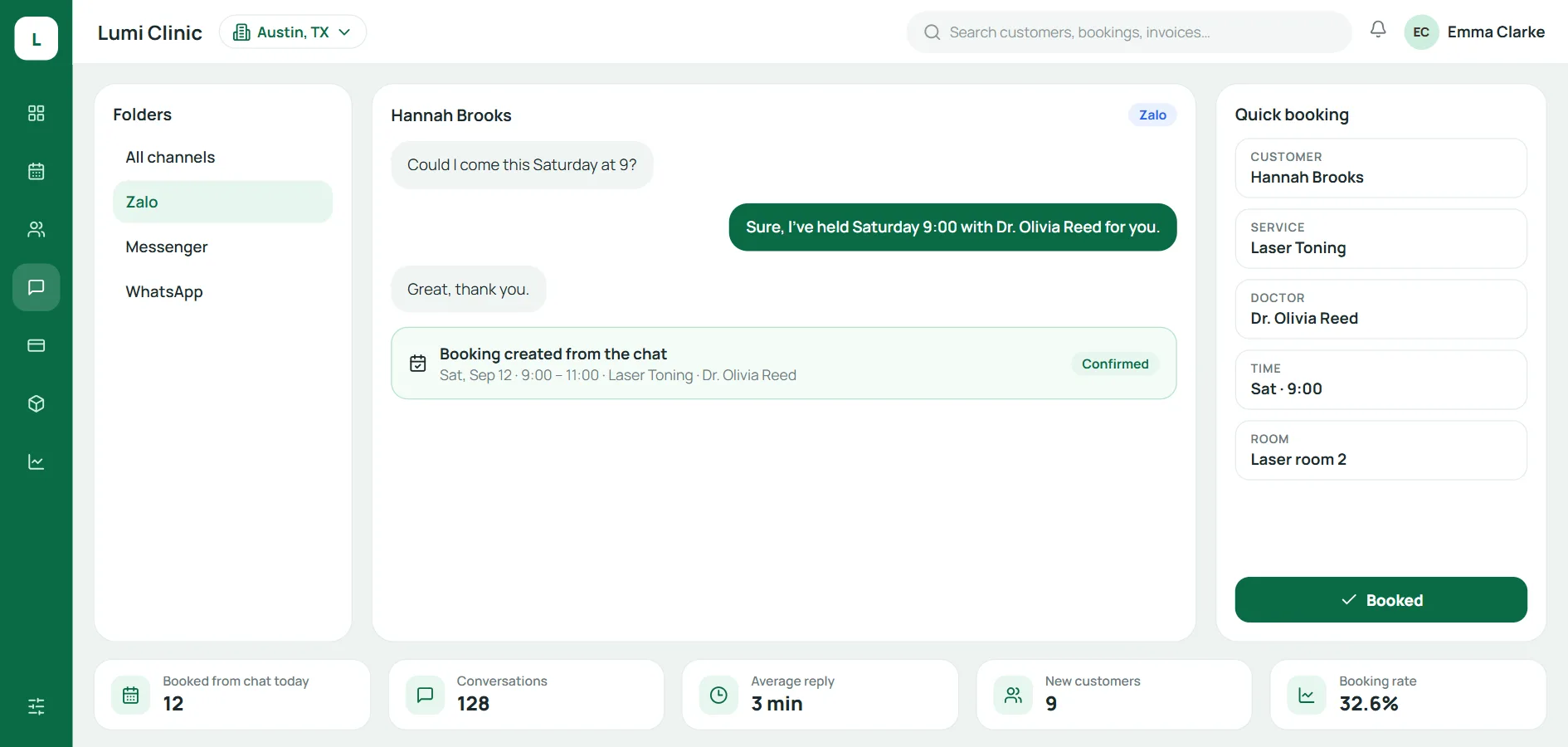
Every client has one record with their details, consultant notes, doctor notes, before-and-after photos, active packages and balance. Messages from 9 channels such as Zalo, Messenger, Instagram and WhatsApp arrive in one inbox and attach to the right record.
Appointments and treatment packages
Appointments are organised by doctor, technician, room and bed. When a client uses a session from a package, the remaining count updates by itself, with no need to check the notebook.
Client care and follow-up visits
Each group of clients, such as unconfirmed, follow-up or long treatment courses, is marked with its own colour. Staff message clients from the shared inbox, send a reminder one day ahead and invite clients back when their next session is due.
Reports by client, staff and branch
Reports on revenue, visits, commission and performance are broken down by client, staff member and branch, so the owner can compare and make decisions every week.
Who is Qub-X for?
Clinic owners: follow revenue and activity at every branch in one online clinic management software.
Managers: plan schedules, set permissions, keep packages and balances under control.
Staff: front desk, consultants, doctors and cashiers work on the same client record, with no re-entry.
4. Frequently asked questions about clinic management software
Is online clinic management software safe?
Clients' health information is sensitive personal data under Vietnam's Personal Data Protection Law 2025, so the software should set permissions by role, so each staff member sees only what their job needs, and log important actions. When choosing online clinic management software, ask how data is backed up and how you can export it.
How much does clinic management software cost?
The cost depends on the package, the size of the clinic, the number of branches and the level of setup support. With Qub-X, a clinic receives a quote after a short consultation and can try the software free for 14 days before deciding.
How long does setup take, and can staff who are not good with technology use it?
It depends on the clinic's size and how much old data there is. The Qub-X team sets up accounts, moves the data and trains staff until the whole clinic uses it confidently, with support through Zalo OA and Messenger from Monday to Saturday.
Can data be moved from Excel into the software?
Yes. Client records, treatment packages and balances from Excel or older software are moved into Qub-X and checked before the clinic goes live.
Conclusion
Clinic management software keeps client data in one place, connects every step from consultation and booking to treatment and payment, and lets every branch run the same way. Instead of collecting details from Zalo, the appointment book and Excel, the team works on one record per client. If your clinic is looking for a system like this, start a 14-day trial or book a Qub-X demo to see the software running on your own clinic's process.
Related articles
All articles on Clinic operations- Clinic operations
Aesthetic clinic management software: 12 criteria for choosing in 2026
A licensed aesthetic or dermatology clinic should not choose software the way a spa does. 2026 brings an electronic medical record deadline, mandatory e-prescriptions and a new personal data law. Here are 12 criteria to get the choice right first time.
- Clinic operations
Spa customer records: bring scattered customer data into one place
When consultation notes live in chat, treatment history in a notebook and payments in a spreadsheet, a spa loses more than search time. What should a customer record hold, and how do you bring it all into one place?
- Clinic operations
Aesthetic clinic operations: a 7-step process and SOP checklist
Having enough staff yet always feeling short-handed is usually a sign of a fragmented process. Here are 7 standard steps from intake to follow-up visit, with a responsibilities table and a checklist for each step.