Skip navigation

CRM for multi-branch aesthetic clinics

One platform to manage your entire clinic operation

Qub-X CRM unifies scheduling, customer records, omni-channel conversations, payments, inventory and reporting in one connected workspace built for aesthetic clinics.

Book a demo

Core clinic workflows in one workspace

Scheduling
Records
Inbox
Payments
Reports
Stock

The operational problems Qub-X helps you solve

Scattered customer data

Keep consultation notes, care history, and transaction data out of scattered files and chat threads.

Disconnected clinic workflows

Bring lead intake, scheduling, treatment, payment, and follow-up into one connected clinic workflow.

Manual reporting that slows teams down

Review revenue, bookings, team performance, and customer status from one shared source of truth.

Data security concerns

Role-based access, branch controls, and activity logs help clinics manage sensitive customer data with more confidence.

Old way vs Qub-X way

When your data is no longer siloed, operations become easier to control.

Old way

Scheduling lives in a separate app
Packages are tracked in spreadsheets
Messages are split across channels
Reports are assembled at the end of the day

Qub-X way

Qub-XCRM
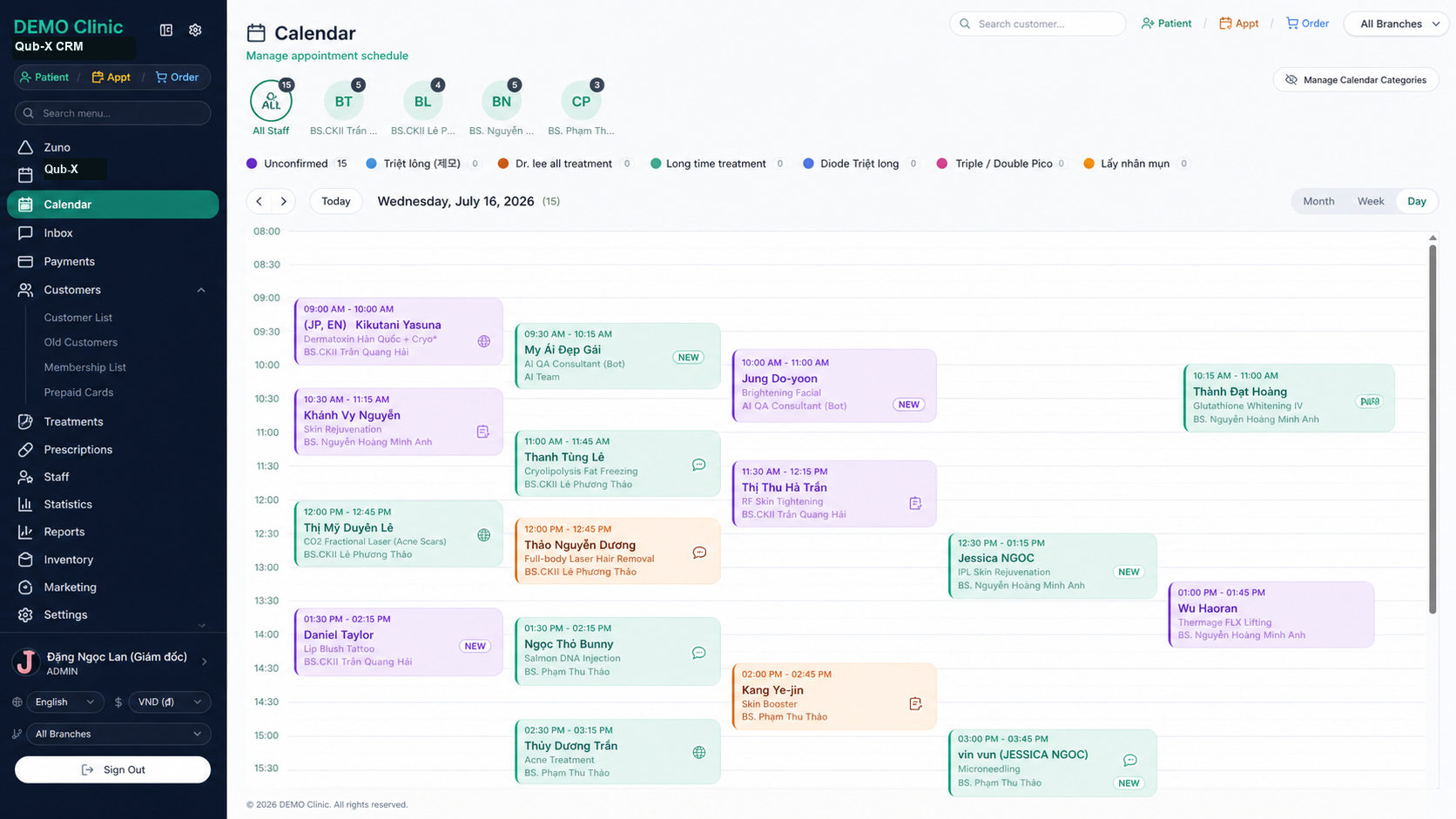
Rooms, beds, staff and bookings share one calendar
Packages, prepaid cards and balances live in the customer record
9 messaging channels in one shared inbox
Operational dashboards update from the same source of truth

Operational value

Unify every step of the customer journey.

From the first message to booking, treatment, payment and aftercare, Qub-X helps every team work from the same source of truth.

01

Never miss a new lead

Bring multi-channel conversations, consultation status, and interaction history into one place so your team always knows what each customer needs and what should happen next.

02

Keep appointments under control

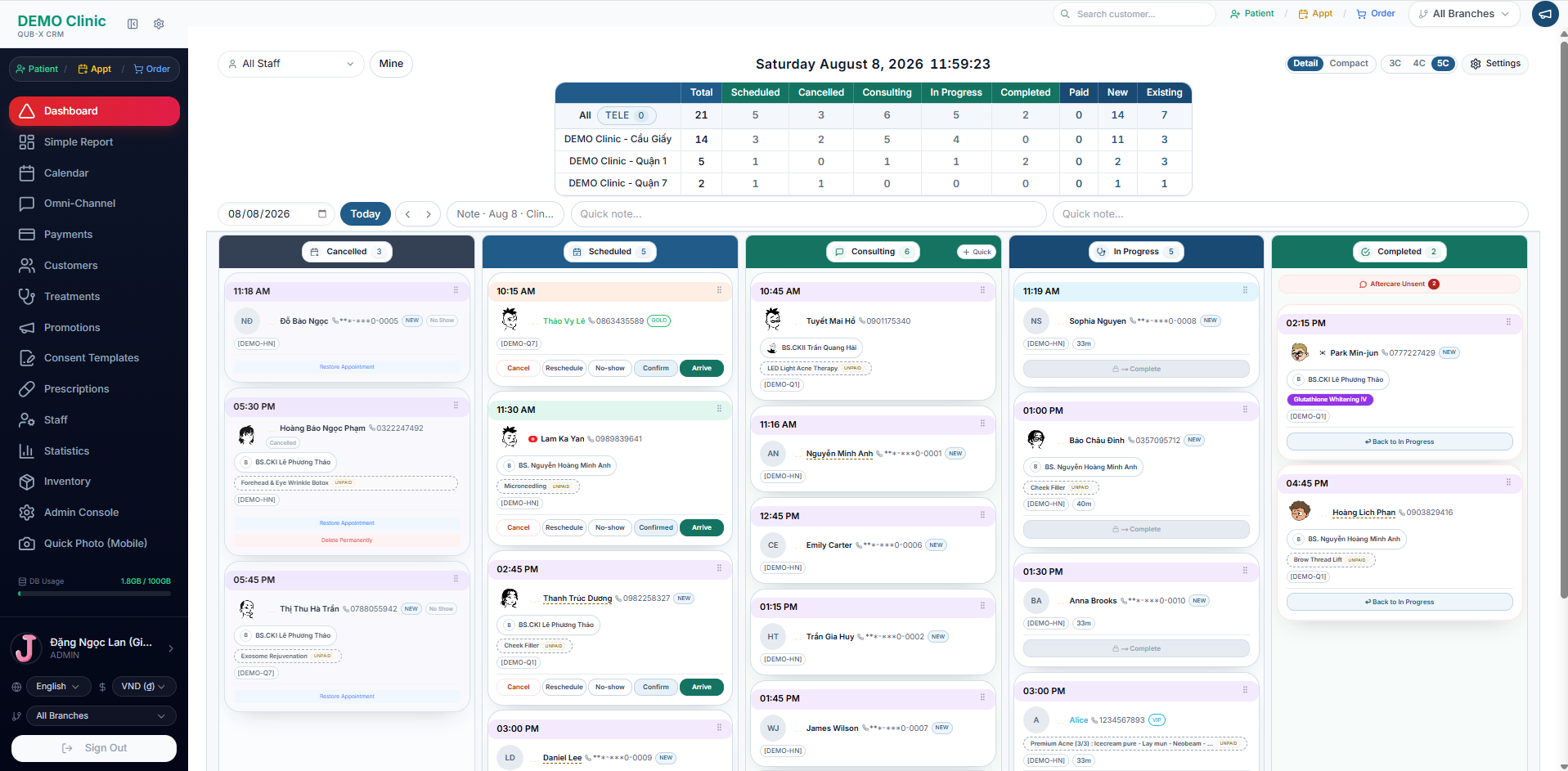
See appointments, staff, rooms, services, and customer progress in one real-time view.

03

One continuous customer profile

Keep consultation details, treatment history, packages, payments and every interaction inside a single customer record.

04

Manage every branch from one system

Set access by role and branch while monitoring every clinic from one central system.

Qub-X CRM features

Manage your clinic’s most important workflows on one screen.

See how customer data, teams, and daily workflows come together in Qub-X.

Front desk

Scheduling and payments

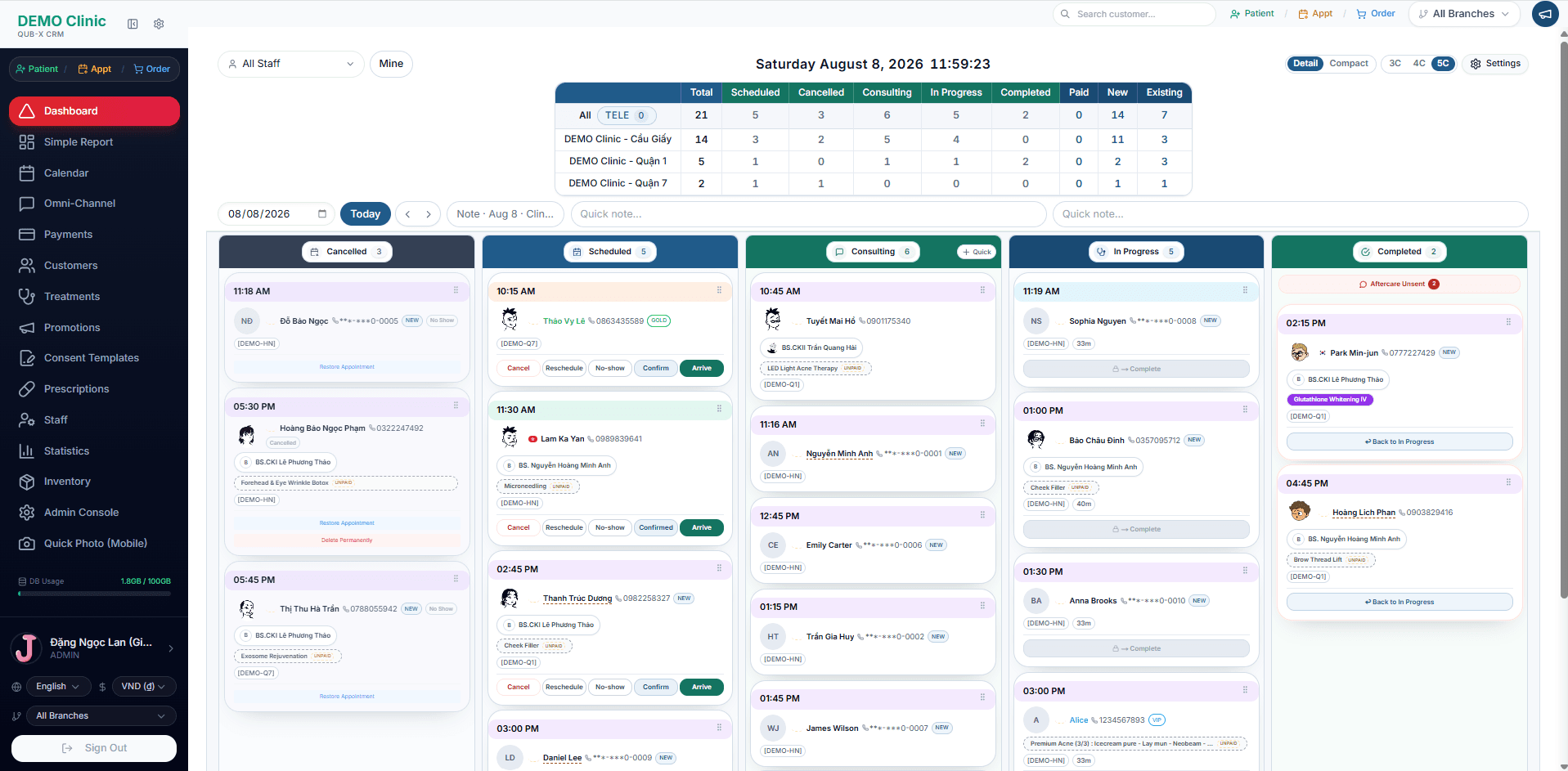
Front desk teams can book, reschedule, collect payments, issue invoices, and manage outstanding balances from one workflow.
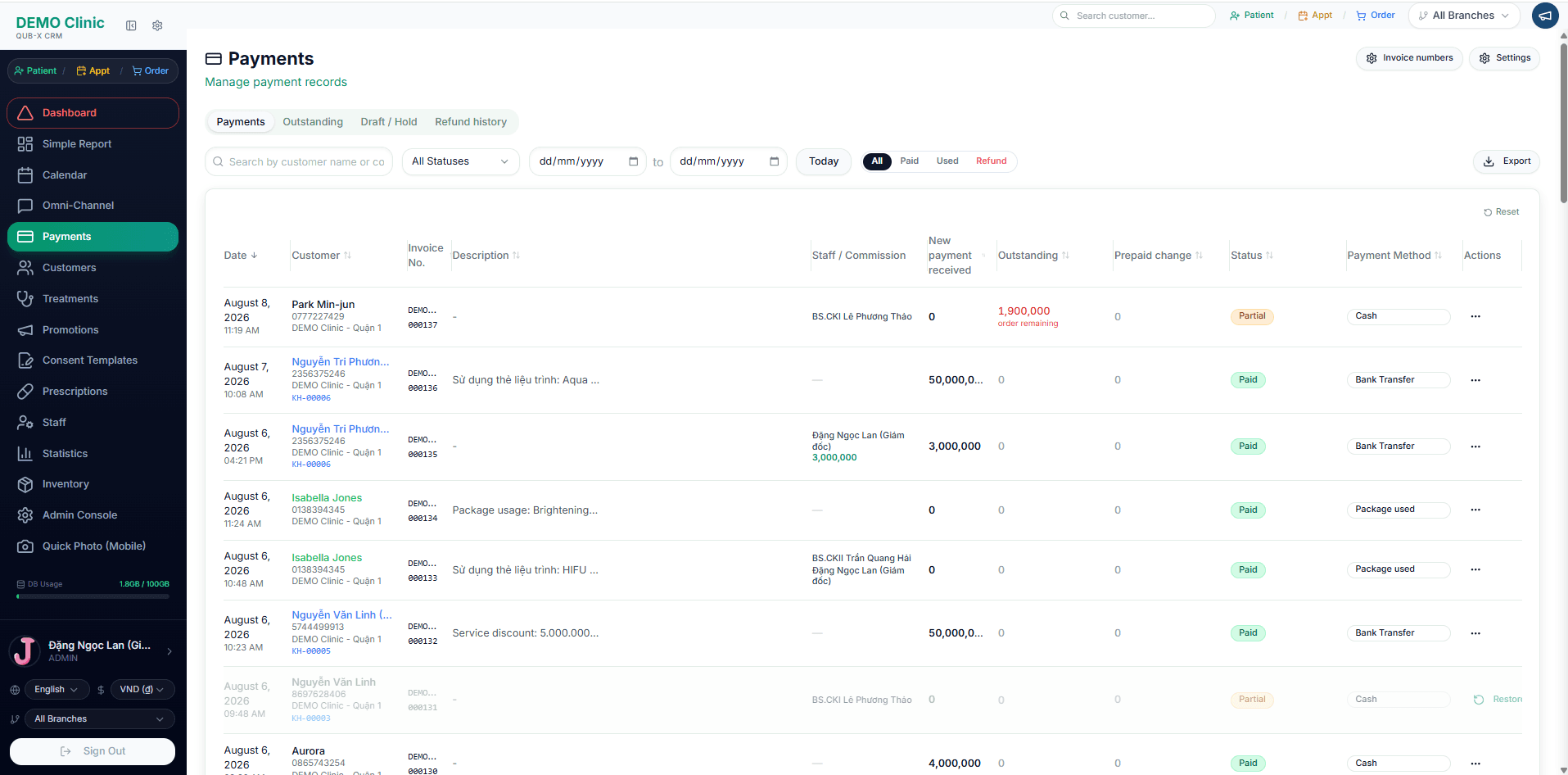
  • Calendar by room, bed and staff
  • POS, treatment packages and prepaid cards
  • Connections to Vietnamese e-invoice providers
Qub-X CRM / Scheduling and payments
Scheduling and payments

Customer record

Customer care and records

Give every customer one continuous profile: consultation history, images, packages, balances and care notes.
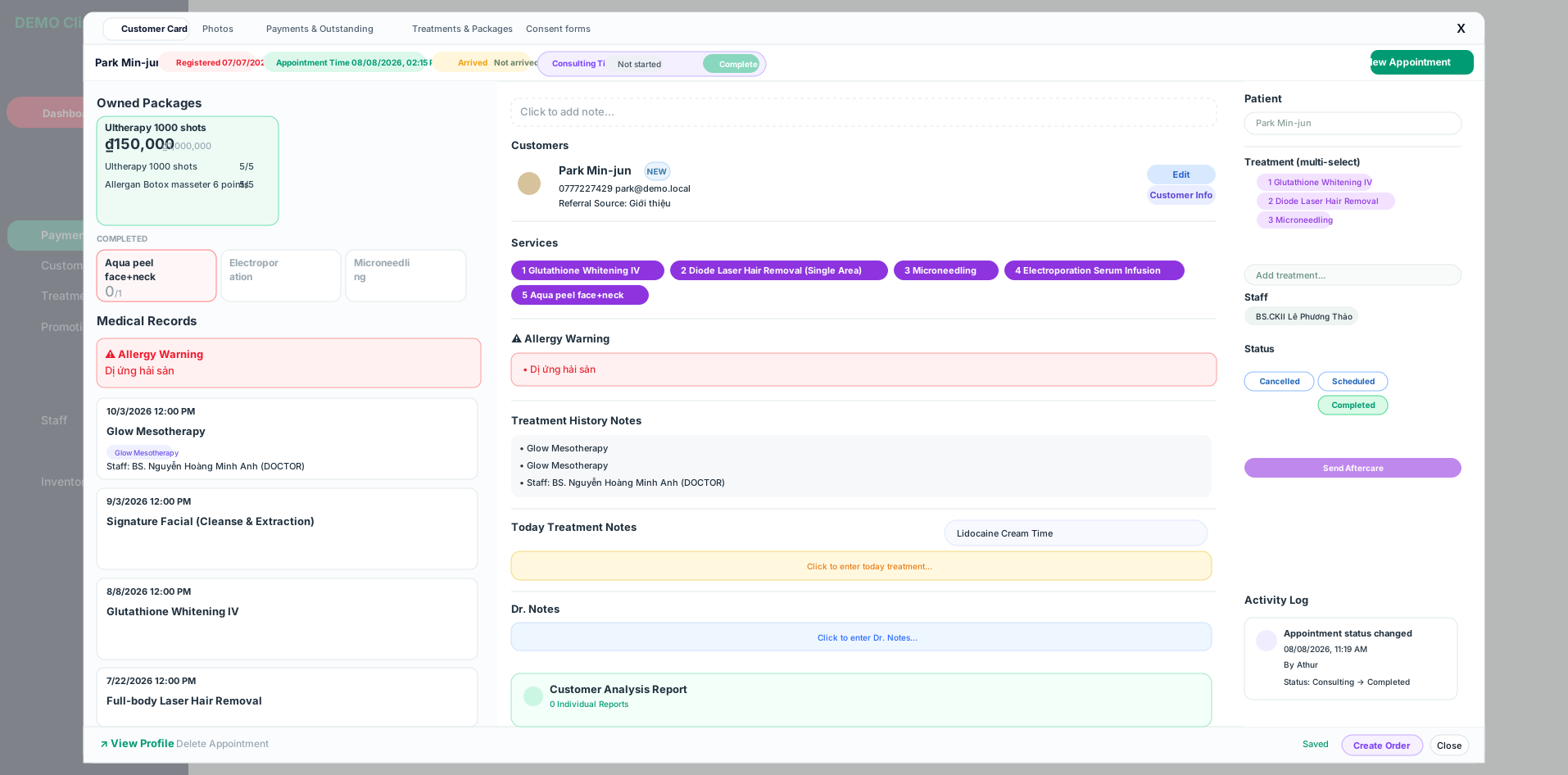
  • CRM with lightweight EMR support
  • Before-and-after images for each visit
  • Fast Vietnamese search, with or without accent marks
Qub-X CRM / Customer care and records
Customer care and records

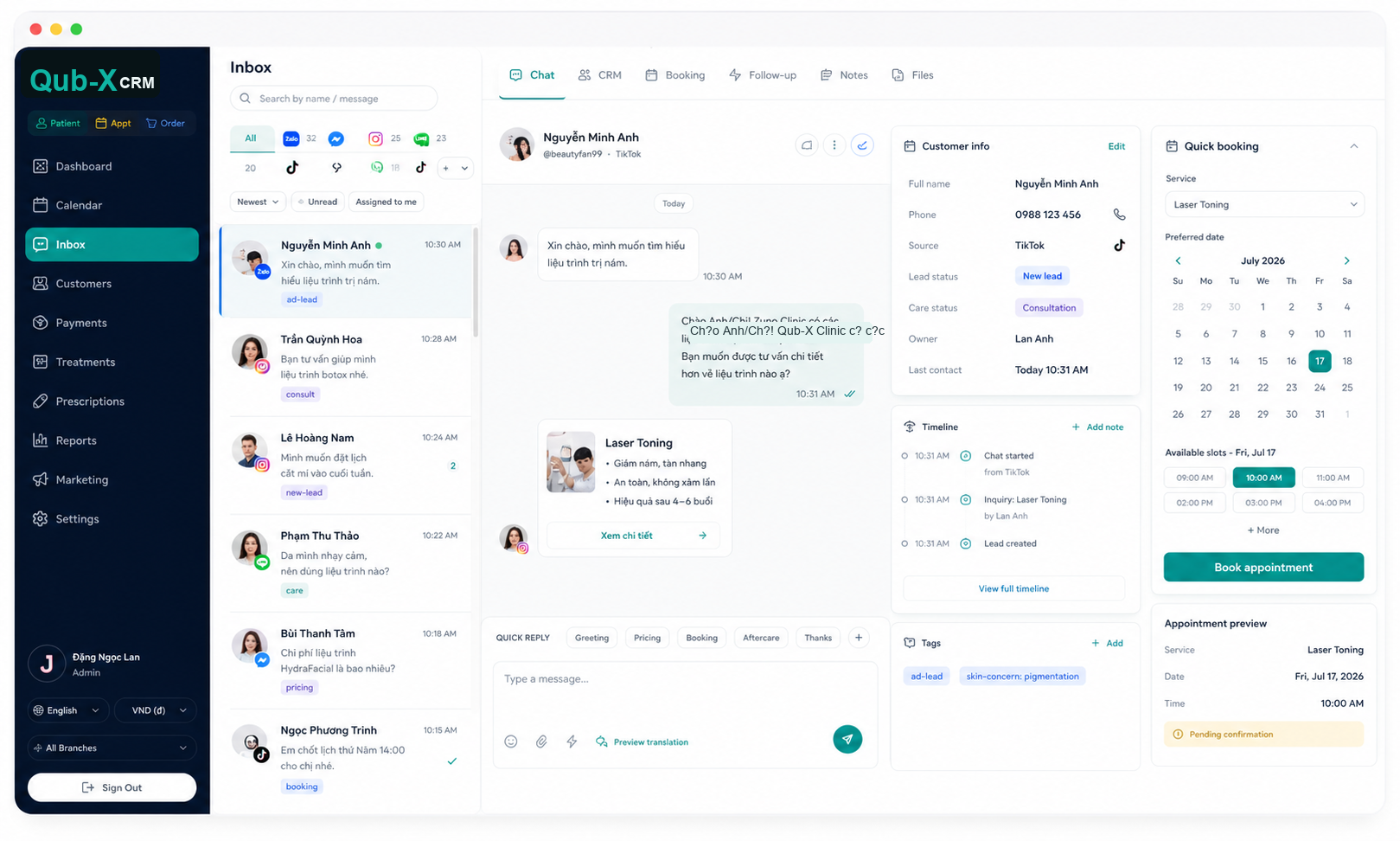
No tab-switching

One-Screen Workflow

Handle chat, CRM context, booking, and follow-up from a single screen.
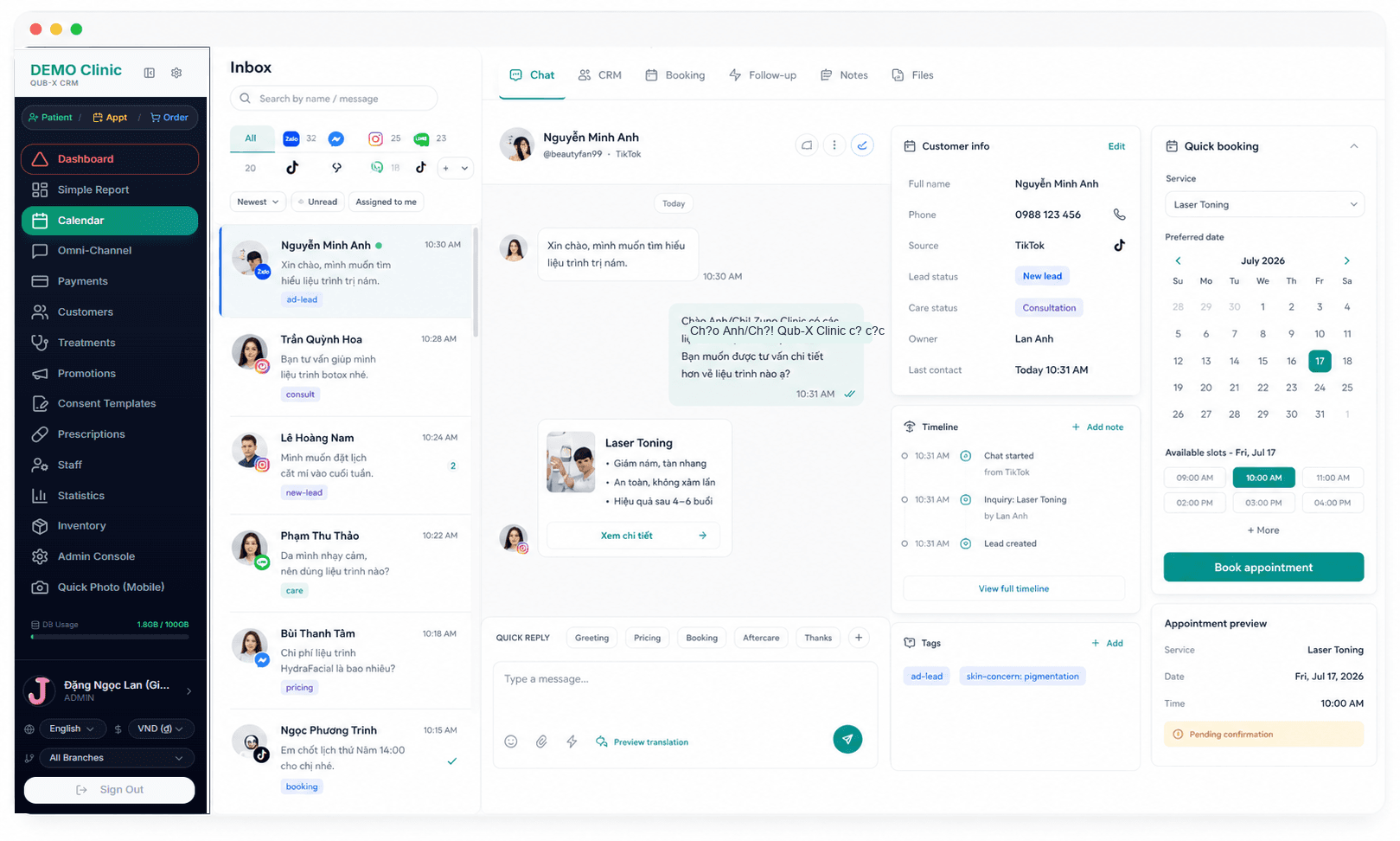
  • Quick booking: Make appointments instantly without leaving the inbox.
  • Live customer context: Keep profile, source, care status, and timeline beside the conversation.
  • Everything your team needs to act: Use templates, notes, tags, and follow-up controls from one screen.
Qub-X CRM / One-Screen Workflow
One-Screen Workflow

Omni-channel inbox

Every conversation in one inbox

Centralize messages from Zalo, Messenger, Instagram, LINE, KakaoTalk, WhatsApp, WeChat, Telegram, and TikTok, then link each conversation directly to the customer record in CRM.
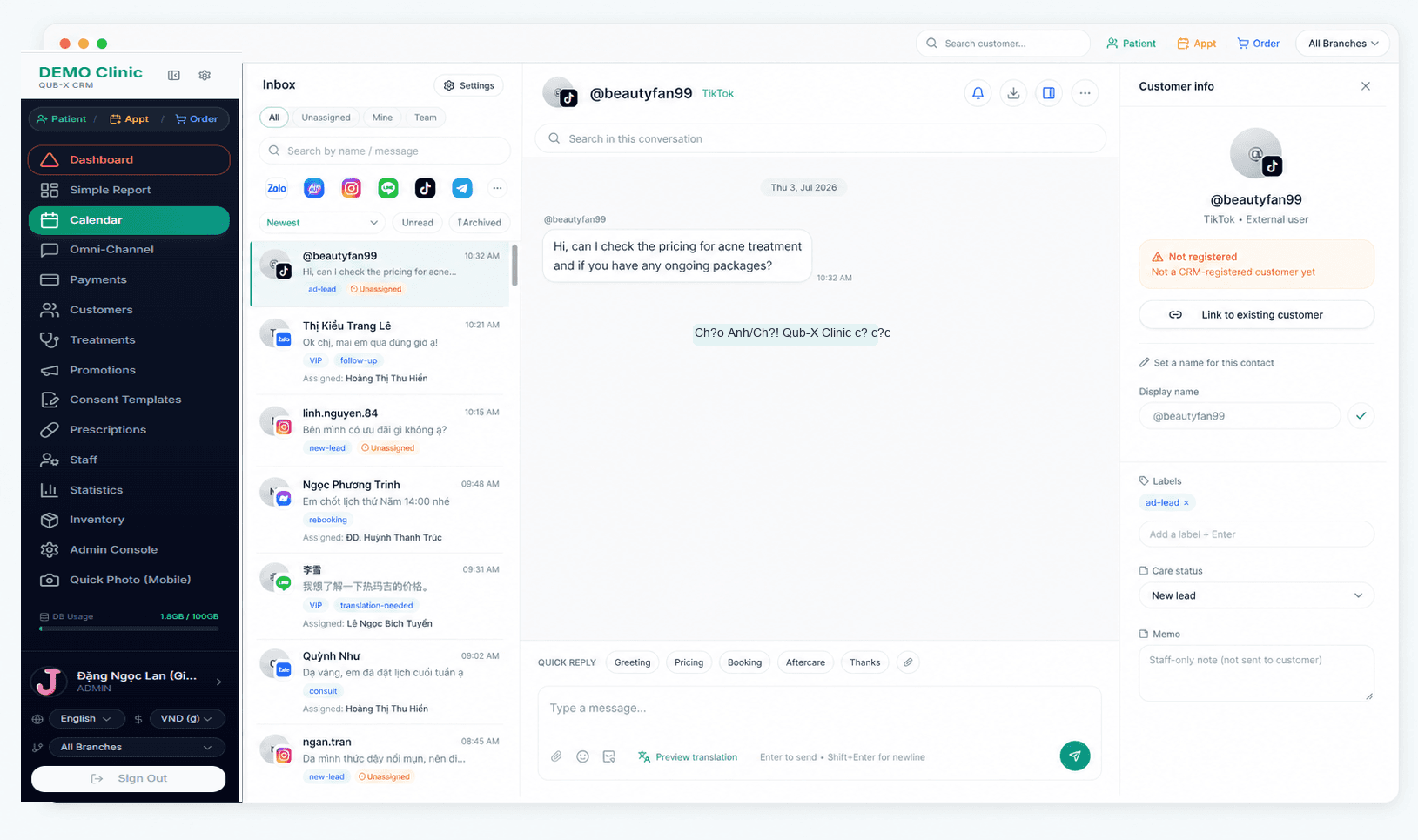
  • One unified inbox for 9 messaging channels.
  • Filter by channel, new, unread, archived, and assigned owner.
  • Apply labels, assign staff, and retain the complete conversation history.
  • Use quick replies, open the CRM record, or create an appointment from the conversation.
Qub-X CRM / Every conversation in one inbox
Every conversation in one inbox
EXPLORE OMNI-CHANNELEXPLORE OMNI-CHANNEL

Integrations

Connect 9 messaging channels your clinic uses every day.

View connected channels
Qub-X kết nối 9 kênh hội thoại trong một phần mềm

Data for decisions

Operational reporting

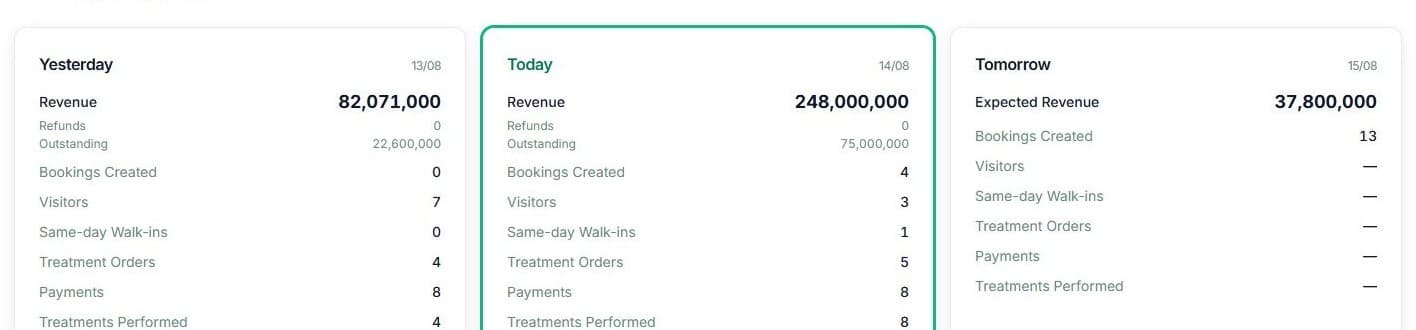
Two reporting layers for two needs: quick daily operations and deeper period analysis.

Simple Report

Run today

Quickly read revenue, appointments, arrivals and outstanding balances.
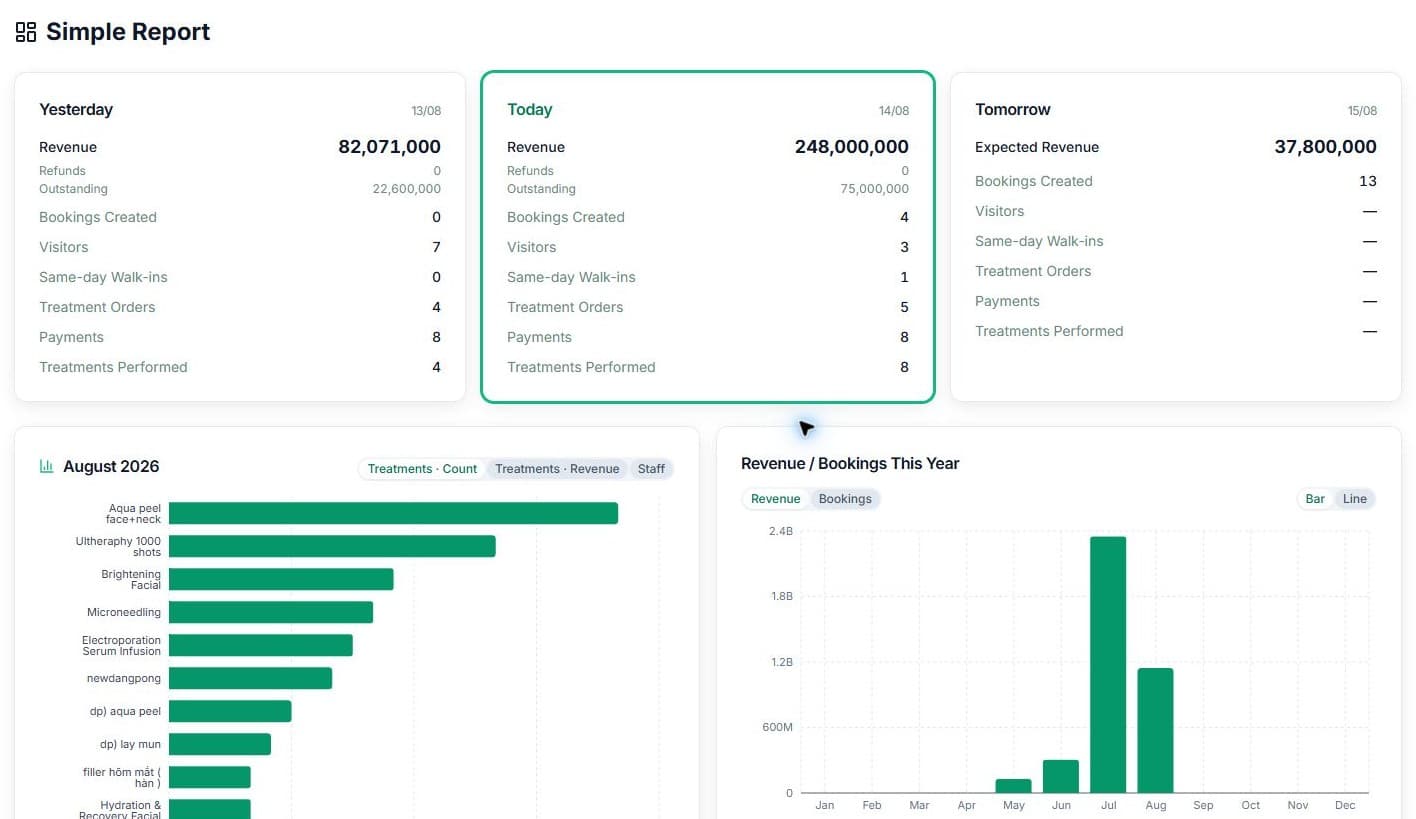
Full Simple ReportFull Simple Report screen in Qub-X CRM
3 operating daysYesterday, Today, and Tomorrow metrics in Simple Report
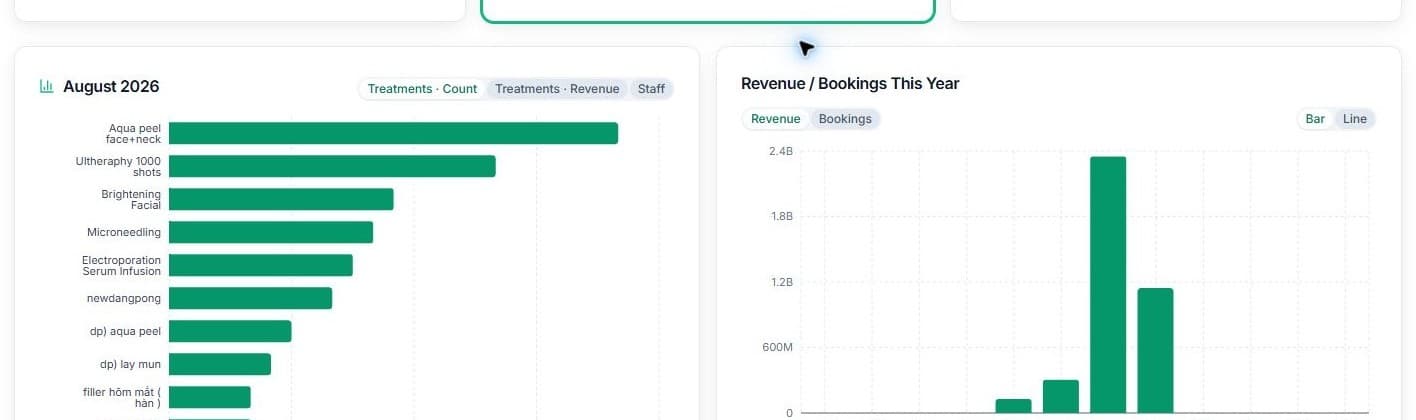
Services and revenueService and revenue charts in Simple Report

Is today running properly?

RevenueBookingOutstanding
Deep Report

Deep analysis

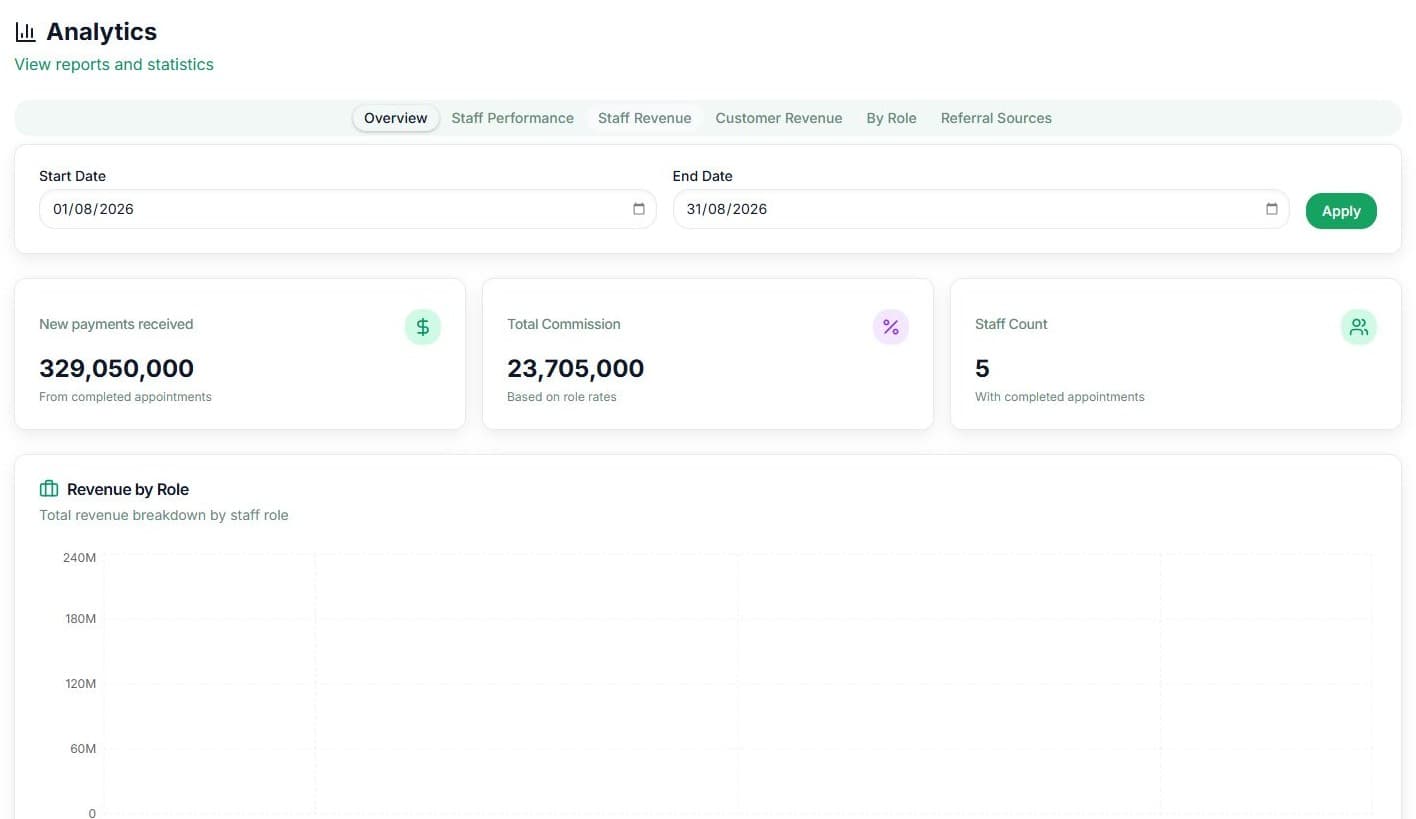
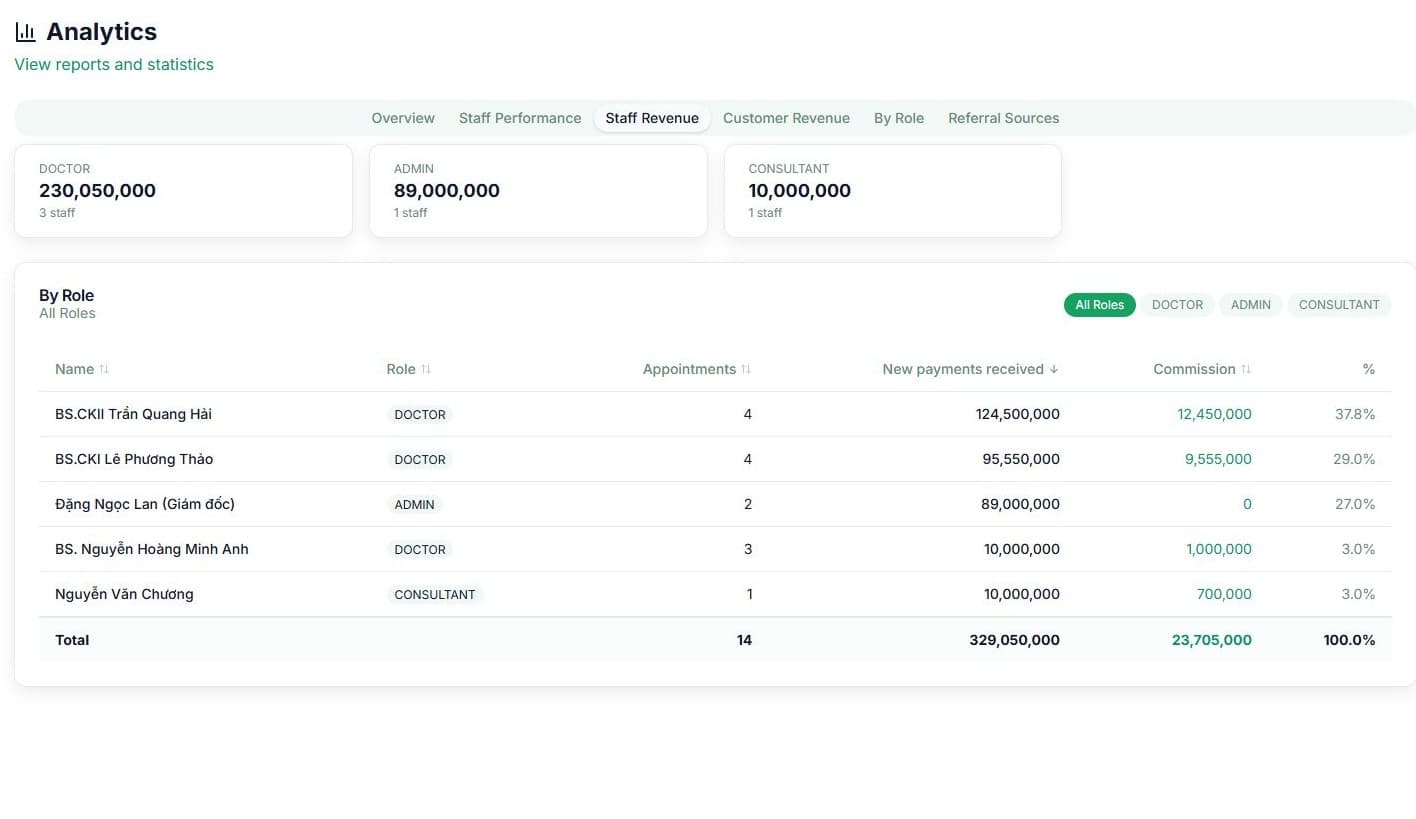
Analyze revenue, team performance and customer sources.
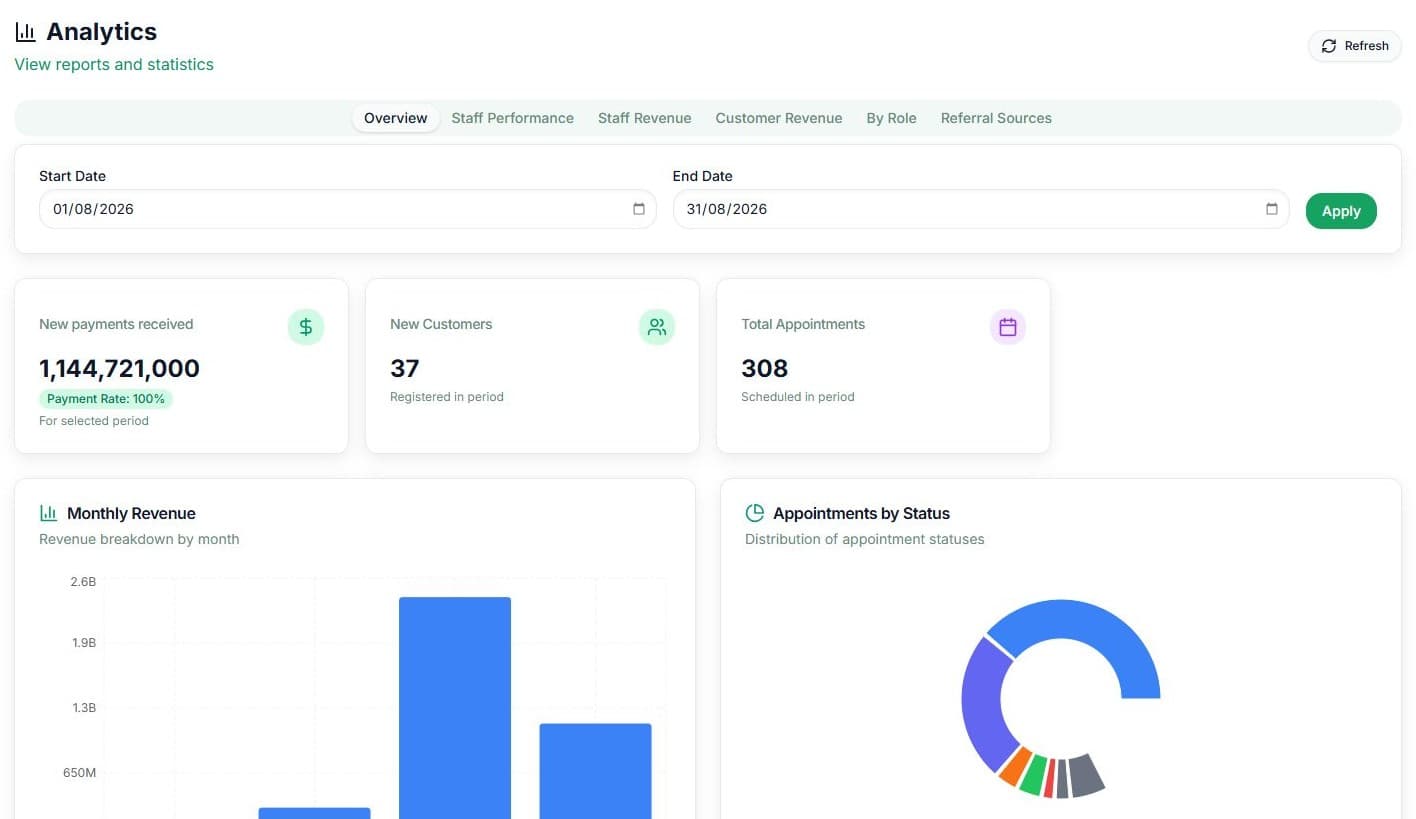
Statistics overviewStatistics overview in Qub-X CRM
By RoleRevenue by role report in Qub-X CRM
Staff RevenueStaff revenue table in Qub-X CRM

Where should you optimize?

StaffCommissionSources

Rollout

Roll out in stages to reduce migration risk.

01

Audit the current workflow

Map current tools, booking flows, customer data, chat channels and operational bottlenecks.

02

Configure the workspace

Set up branches, roles, services, rooms, beds, booking statuses and access rules.

03

Migrate data and train teams

Prepare baseline data and train front desk, consultants, doctors, and managers using your real clinic workflows.

04

Review after launch

Check reporting, inbox, payments, permissions and optimization needs after the first phase of use.

The rollout focuses on data, permissions, and team training.Book a demo

MULTILINGUAL OPERATIONS

Work in Vietnamese, English, or Korean.One unified workflow.

Qub-X supports Vietnamese, English, and Korean, helping clinic staff work in the same system in the language that fits how they work.

Each user can choose their display language without changing the shared operational data.

Product packages

Choose the platform that fits your clinic

From one location to a multi-branch chain, Qub-X is configured around real operating needs.

Growth

Digitize core operations for a single-branch clinic.

  • 1 branch, 5 accounts, 20GB data
  • Appointments and customer records
  • Sales, payments and outstanding balances
  • Basic operational reporting
  • Setup, data migration and onboarding
Explore Growth
Popular

Accelerate

Centralized management and synchronized growth for multi-branch teams.

  • 1-4 branches, unlimited accounts, 200GB data
  • Everything in Growth
  • Centralized multi-branch management
  • Permissions by role and team
  • Omni-channel inbox and expanded training
Explore Accelerate

Custom

A tailored solution for larger chains and custom operating models.

  • 5+ branches, unlimited accounts, custom data capacity
  • Multi-branch customer management platform
  • Workflow customization by operating model
  • Third-party system integrations
  • Dedicated migration, training and support
Discuss Custom

Integrations when needed:

Meta, Zalo OA, LINE and TikTok
WeChat, KakaoTalk and Telegram
Configuration advice by scale, data and integration needs

Configuration and rollout recommendations are built around your clinic’s scale, data and real integration needs.

14-day free trial

SECURITY & LOCALIZATION

Secure by design. Flexible across markets.

Qub-X helps clinics control access, track activity and operate consistently across multiple branches and languages in one system.
Clear permissionsTransparent trackingMultilingual operations
Qub-X Control Center

Roles & Permissions

Branch: District 1 · Role: Consultant
Customer profile: View only
Payments: Hidden
Reports: Branch scope

MULTI-DEVICE

One consistent experience across every device.

Monitor clinic operations from desktop, tablet, or mobile, so teams stay aligned at the front desk or on the move.

Full operating control

Stay in control from a larger screen.
Qub-X CRM
Qub-X CRM desktop interface inside a large screen frame

FREQUENTLY ASKED QUESTIONS

Common questions before booking a demo.

Answers to common questions about rollout, multi-branch operations, data access, and pricing.

Still have questions?

Talk directly with the Qub-X team about your clinic's operating model.

Book a demo
01Can Qub-X replace or connect with the tools our clinic already uses?

Yes. Qub-X can replace disconnected parts such as scheduling, customer records, POS, inboxes and reporting. For tools you need to keep, the team can review what should be integrated and what should be rolled out in phases.

02Can multiple branches operate on one system?

Yes. Qub-X supports multi-branch operations, so owners can see the full picture while each team member works within the right branch and role scope.

03How is data access managed between roles and branches?

Access can be controlled by role, branch and job scope. Front desk, consultants, doctors and managers can each see the data they need without exposing unnecessary information.

04How long does implementation and team training take?

Timing depends on branch count, data migration and current workflows. The demo helps define a practical rollout scope and training plan.

05How is Qub-X pricing calculated?

Pricing depends on the selected package, integration needs, implementation support and operational scale. You can start with a trial to evaluate fit first.

BOOK A DEMO

See how Qub-X fits the way your clinic works.

Share how your clinic operates. The Qub-X team will prepare a demo focused on your workflow and needs.

A 30-minute demo based on a real clinic scenario
Focus on the features you care about
No commitment required after the demo

Your demo can focus on

SchedulingInboxPaymentsReports
Which areas do you want to review?

The Qub-X team will contact you to confirm a suitable time.

Book a demo