
Features Omni-channel chat

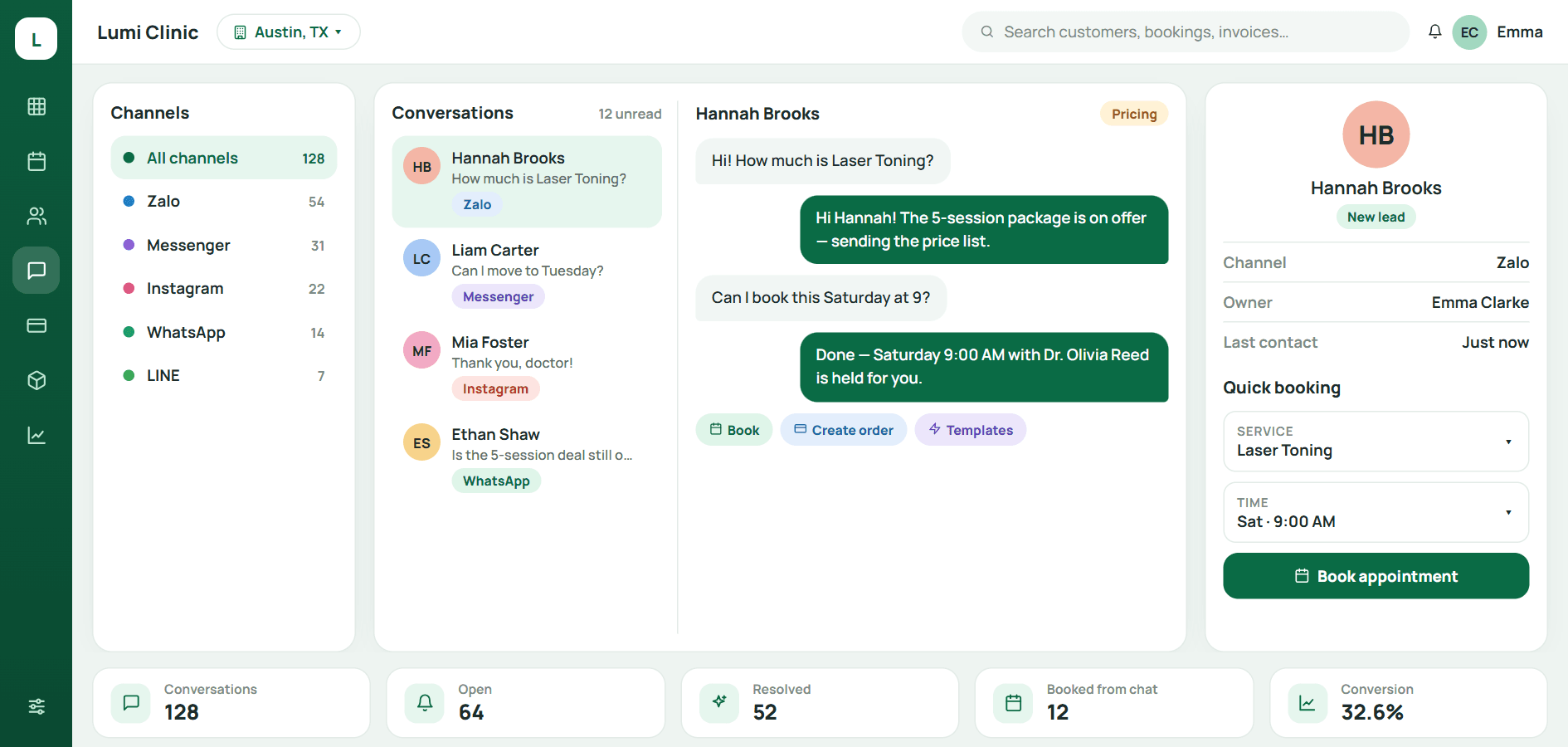
Wherever customers message, the clinic replies from one inbox

Qub-X connects the chat platforms your clinic chooses. Zalo, Messenger, Instagram, WhatsApp, KakaoTalk and more, into one inbox tied to customer records and appointments. Which channels are on is up to the clinic.

  • Pick your own channels
  • Clear ownership
  • Book inside the chat
Omni-channel inbox in Qub-X CRM
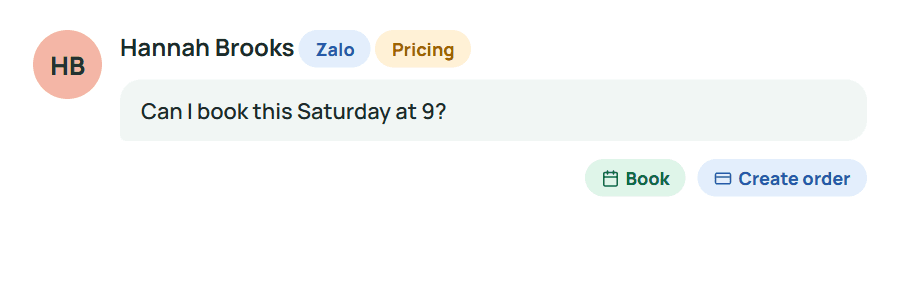
Message from Zalo
A Zalo message with book and create-order actions
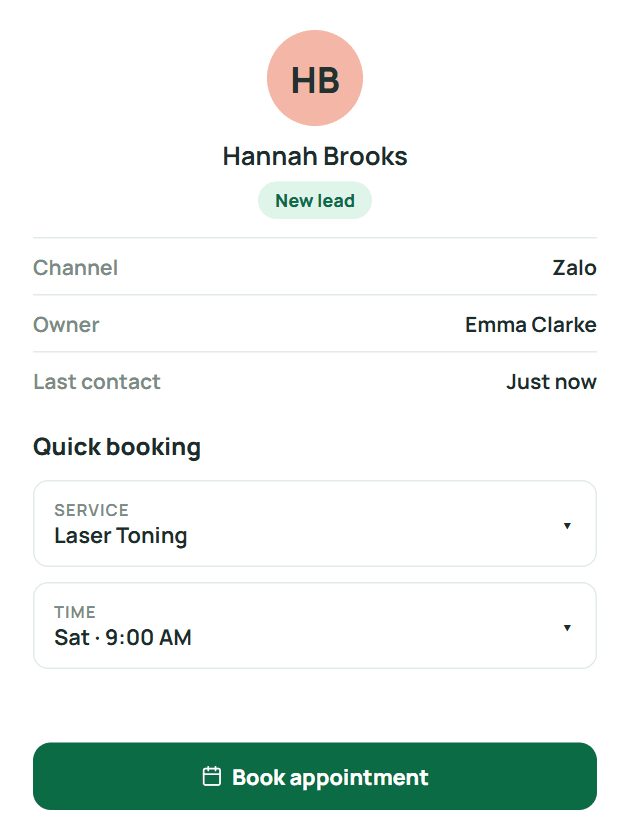
Record beside chat
Customer record and quick booking beside the chat

Versus the old way

One message becomes one appointment: 4 apps → 1 inbox.

The customer messages, the consultant sees the record and past appointments at once and books in the same window. No app switching, no re-asking, no forgotten replies.

  • Fewer stepsRead, reply, check the record and book in one window.
  • No lost leadsUnread, unassigned and long-waiting threads are flagged in the list.
  • No retellingHistory and internal notes live on the thread; the next shift picks up in place.

The usual way

  1. 1Open Zalo on a personal phone
  2. 2Switch to Messenger to check for new messages
  3. 3Open the CRM and search the customer by name
  4. 4Ask a colleague what was already discussed
  5. 5Go back to the app to send the time

4 apps, 5 steps, easy to miss

With Qub-X

  1. 1Open the inbox, the record is already on the right
  2. 2Reply, click New appointment, pick a time, done

1 inbox, never leave the window

The problem

When a customer messages on Zalo at 9, someone sees it at 9:30.

Messages sit on each staff member's phone, one app per channel. Who replied, what was said, whether the customer booked, nobody knows, and the customer leaves before anyone follows up.

  • One phone per channel, one person holding it
  • Unread leads that nobody chases
  • Asking the customer again because there is no history

The usual way

  1. 1Open Zalo on a personal phone
  2. 2Switch to Messenger to check for new messages
  3. 3Open the CRM and search the customer by name
  4. 4Ask a colleague what was already discussed
  5. 5Go back to the app to send the time

4 apps, 5 steps, easy to miss

What stands out

When you open the inbox, every connected channel is in one list.

Zalo, Messenger, Instagram, WhatsApp, KakaoTalk… the clinic picks which channels to connect. Every conversation carries labels, an owner and a waiting time; the customer record sits right beside the chat.

  • Filter by channel, new, unread, owner
  • Intent labels and long-wait alerts on each conversation
  • Customer record and next appointment beside the chat

Saves retyping the name

When the customer says yes, book them inside the chat.

The new-appointment panel slides out beside the inbox with name and phone prefilled. Pick service, time and branch, the confirmation goes back on the channel they are already using.

4 apps, 5 steps, easy to miss1 inbox, never leave the window
  • Never leave the inbox, never retype the name
  • Link a new contact to an existing record with one click
  • Quick replies and FAQ for repeated questions

Easy to use

When shifts change, the next person picks up exactly where it stopped.

The full conversation history, internal notes and owner live on the thread. Reassign to a colleague with one click; no forwarding, no retelling.

  • Internal notes never sent to the customer
  • Reassign a thread and the history goes with it
  • Works on desktop and phone

Three questions consultants ask

Which channels can be connected?
Zalo OA, Messenger, Instagram, WhatsApp, LINE, KakaoTalk, WeChat, Telegram and TikTok are the most common; we connect the ones you already use.
What if a customer messages from an unknown number?
The thread shows as a new lead; click Link existing customer if there is a record, or create one right in the side pane.
Can staff see each other's conversations?
Depends on permissions. By default the owner sees theirs; managers see all and can reassign.

BOOK A DEMO

See how Qub-X fits the way your clinic works.

Share how your clinic operates. The Qub-X team will prepare a demo focused on your workflow and needs.

A 30-minute demo based on a real clinic scenario
Focus on the features you care about
No commitment required after the demo

Your demo can focus on

SchedulingInboxPaymentsReports
Which areas do you want to review?

The Qub-X team will contact you to confirm a suitable time.